July 16, 2026
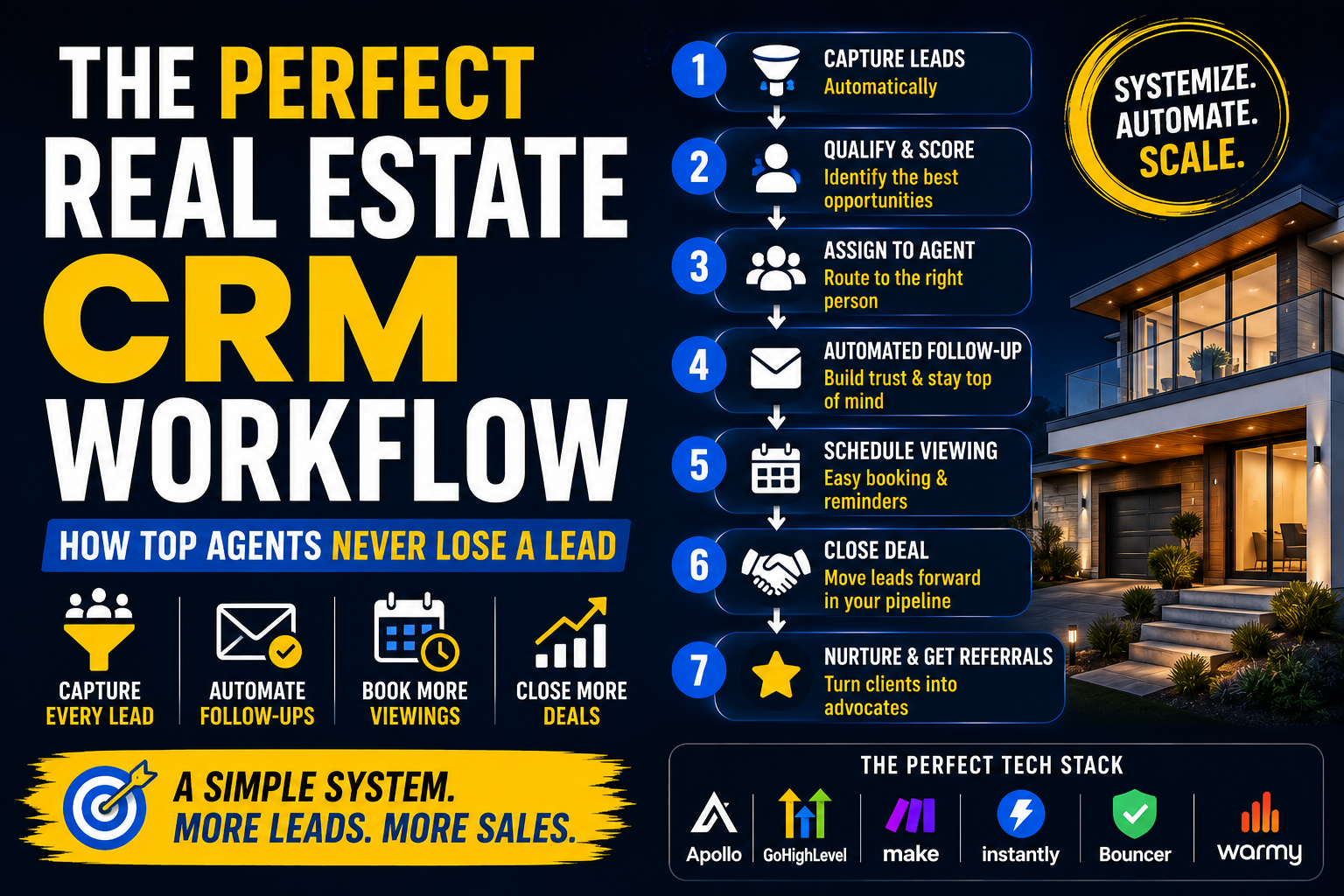
The Perfect Real Estate CRM Workflow (How Top Agents Never Lose a Lead)
Real Estate
Click here to checkout the software

Buying a CRM is easy.
Using it properly is much harder.
I've seen agencies spend thousands on software only to keep managing leads in spreadsheets or sticky notes.
The problem isn't the CRM.
It's the workflow behind it.
The best real estate businesses don't just collect leads.
They move every prospect through a structured process until they either become a client—or clearly aren't a fit.
In this guide, I'll show you a practical CRM workflow that any real estate agent or brokerage can implement.
A CRM isn't magic.
If nobody updates it, follows up, or automates repetitive tasks, it's simply an expensive database.
The goal isn't storing contacts.
The goal is making sure every lead receives the right action at the right time.
Every enquiry should enter your CRM automatically.
That includes leads from:
Nothing should rely on manual data entry.
For growing agencies, GoHighLevel is one platform that combines CRM, forms, calendars, automation, and communication tools.
Try it here: GoHighLevel
Free trial available.
Not every enquiry deserves the same level of attention.
Ask questions like:
Once qualified, assign a priority.
This helps your team focus on the highest-value opportunities first.
Growing brokerages shouldn't manually distribute enquiries.
Instead, create simple rules.
For example:
Automation ensures every lead reaches the right person immediately.
Most prospects won't respond to your first email.
That's completely normal.
A better workflow includes automated follow-ups over the following weeks.
For example:
Day 1
Welcome email.
Day 3
Helpful buying or selling guide.
Day 7
Recent market update.
Day 14
Invitation to book a valuation.
For outreach campaigns, Instantly makes this process much easier.
Try it here: Instantly
Free trial available.
Once someone shows interest, booking should be effortless.
A good workflow automatically:
Reducing friction increases attendance rates.
A simple pipeline might look like this:
At any moment, you should know exactly where every client sits.
One of the biggest mistakes agents make is deleting unsuccessful opportunities.
Not buying today doesn't mean never buying.
Lost leads should continue receiving:
Many eventually return months later.
As your business grows, repetitive tasks quickly become overwhelming.
That's why I'd automate things like:
Make is an excellent platform for connecting all these systems together.
Try it here: Make
Free plan available.
If you're using email as part of your workflow, protect your sender reputation.
Before launching campaigns:
Try it here: Bouncer
Try it here: Warmy
Small improvements in deliverability often produce significant increases in reply rates.
Avoid these common problems:
Consistency is far more important than complexity.
The best CRM isn't necessarily the one with the most features.
It's the one your team actually uses every single day.
A clear workflow ensures every lead receives attention, every opportunity is tracked, and every client enjoys a professional experience.
Build the system once.
Then let it work for you.
A typical workflow includes lead capture, qualification, agent assignment, automated follow-up, appointment scheduling, pipeline management, and post-sale nurturing.
Yes. Even enquiries that don't convert immediately may become future clients.
Absolutely. Automation reduces missed follow-ups, improves response times, and creates a more consistent customer experience.
Our latest news and trending topics